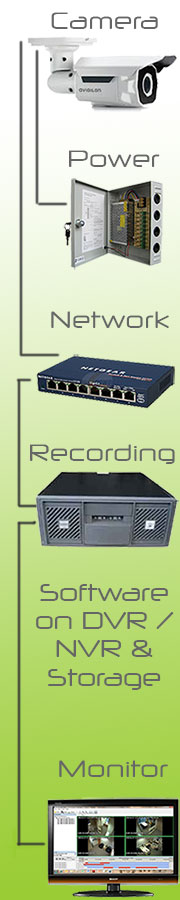
Transmission - Cables / Wireless:
Depending on the type of technology you want to deploy will determine the type of transmission that will be installed.
Analogue cameras would typically be installed utilising Coaxial cable paired with Power Cable – also known as POWAX cable. At either end of the cable a BNC Connector will be installed.
The alternate to Coaxial cable would be to use CAT5 or CAT6 Cable and either side terminated with Baluns. In most case, Baluns will be “passive” but if a further distance is required, “active” baluns can be installed either on one end or on both ends of the cable for very long cable runs. The standard maximum of 100 meters in an IP environment does not play a role in Analogue cameras if CAT5 cable is being used.
IP cameras only work on a TCP/IP backbone. Thus, a normal IP network design is required. Ideally if the network switches were POE (Power Over Ethernet) enabled, this would mitigate the requirement for additional power supplies and cabling to the cameras.
Not any old switch can be used always. If you are running multiple, multi-pixel cameras on a switch, you would need to consider a 10/100/1000 or “gigabit” switch. The amount of POE available also needs to be taken into consideration and thus a POE+ switch may be a requirement.
Wireless solutions are best to be avoided when and where possible as hard-wiring a camera will always remain first prize as wireless transmission can be a bit fickle sometimes interference can occur. However, in certain instances, distance or cost of cabling does not make fiscal sense and a wireless solution becomes more feasible.
In a wireless environment, a power supply will always be a requirement.
Power:
As mentioned above, a camera will always require a power source. In an Analogue CCTV environment, typically POWAX would be utilised or CAT5 cable utilising Baluns. You would also have the added ability to add a battery backed up power supply to cameras if that is a requirement.
IP cameras give you the advantage of using only one cable which has POE (Power Over Ethernet) reducing your installation time and cost. If you require a backed up power, you would need to ensure your switch is running on a UPS (uninterrupted power supply) but that can become costly.
Recording:
Recording and/ or monitoring of surveillance footage is done through a device known as a DVR (Digital Video Recorder) in the case of Analogue and HD Analogue CCTV or an NVR (Network Video Recorder) in the case of an IP based CCTV Solution.
Click here or select "Recording Solutions" for more detials.
Storage:
Depending on the length of time you require your CCTV footage to be stored, the quality / resolution of the footage, the frame rate of recording will all determine the amount of storage you require. Typically drives are available in 1Terabyte (TB), 2, 3 and now 4 and most NVR's or DVRs will have capacity to hold multiple Hard Disk Drives (HDD). It is important to ensure that the drives are specified as “Surveillance” Hard Disk Drives. Two of the better brands to opt for are Seagate and Western Digital (WD).
If you have a very large site or require surveillance to be backed up for an extended period, then Networked Attached Storage (NAS) could be a consideration or a server backing up the required footage.
Recording Software:
We can offer a range of software packages from freely available solutions for smaller installations to the best available products on the market for large, multi-site installations.
Click here to view the different options of recording software options we are able to supply and support.


 Biometrics &
 Time &
 CCTV &
 Intruder
  Fencing &
 X-Ray & Metal
 IP and Smart Intercoms
  Fire
Fire  Public
  Networks & Wireless